Media Player display will have octagonal bulb system. Bees octagonal bulb system allows you rotate the display with accurate 1-1, 2-1, 1-2 coordinate systems. In octagonal system distances to all surrounding bulbs is the same. When so, you can rotate display much like paper on the table. You set the rotation angle to Device Context. When device context has rotation angle, you re-construct the pixel-bulb system with accurate conversions. With reconstructed system, rotated device contexts keep the picture and text quality at the same level with 0 angle picture and text.
With looped system, you can construct wide variety of rotation angles. In looped system, you rotate the picture into one angle. Then you re-read the pixels with 0 angle. Then you rotate the picture again with rotation angle.
The quality of the rotation is dependent on display's bulb systems density and the used rotation accuracy. System gives quite a lot to 3D games and 3D effects. You can have multiple display product lines. High quality displays for designers and game enthusiasts. Bulk displays to businesses and database systems, systems without HW support to rotations.
Windows and other pixel based graphical operating systems downgraded the meaning of display tech. Before these the bulb system / quality of the display showed in the quality of the on-screen text.
Computer downgraded high precision calculations in two way. One comes from 2-base, another is lack of fractional numbers like 1/3. Alongside with lack of fractional numbers constants like PI were converted into approximations. PI has too many numbers for accurate calculation with the resolved number series. You can build fractional numbers with for example two 32 bit signed integers.
- - - -
Currently constructing a sophisticated derivate from TStrings. It is an all-in-one system from various prototypes. It has support for database like records, with dataBase's performance penalty. Fields are built to 32 bit pointers and pointer array. Record system supports self-made pointer arrays for the storage. You pass variable for the self-made pointer array to base object, after that the base object keeps the variable in up-to-date state. When base object resizes or replaces the storage, it changes the variable accordingly. So that the variable always refers to base objects storage ( when storage doesn't exist, the variable is nil ).
Then it will support three kinds of grids : Tabular Grid, with entries for all cells. Spreadsheet grid, with entries for filled cells. Floating grid for Listview like grid system. Have written all three types into separate Tstrings derivates, the new object will get functions from these. Via these object has full support for storing HTML table data. In spreadsheet you can have results and formulas in separate variables. You can also have resolved / compiled formula for the given text formula. Besides textural result, you can have result in numeric variable.
Difference to hardcoded record is, that record length can vary, you can change it on fly. The base object has support for over 70 different data types, objects and buffers.
TStrings interface is built so, that you can have as many string sets in one entry as you need. You can have path definition and file name in two variables. With reference counting the pathnames takes only 4 bytes entry plus one source entry, from where other entries are copied. Base object allows entries to have type related entries in the same field. When you have a picture file, the details contains picture sizes, pixel depths. When you have MP3, the same variable holds MP3 tags. System allows you to have also all HTML tags in one predefined varibale.
Ansi strings reference counting can already be used for widestring and data buffers / records. The base object can store both wide strings and memory buffers into Ansi strings.
Base object supports also buffers without size. Base object inquires the buffer size with memory management functions, when needed. Windows memory manager holds the sizes for each reserved memory block. You can always get the buffer size from there.
Tested Delphi 5's reference counting. It's simple and fast, just as I suspected. When you assign string to another, reference count grows.
When you change another string, reference counts and memory buffers are changed. System never searches or checks strings from equal values.
- Direct move from edit box ( windows buffers ) to a string always creates new buffer.In TStringlist counters have picture like small fault.
When you add new string into that messy ( aka state of art ) pointer array - record system, initial reference count raises to 3.
Same happens when you change the value of an existing string. Otherwise it works.
When you add module level or global string into list, the reference count is preceding count + 3. The module level variable has correct reference-count.

From the table you can see possible date formats for media player.
- There are 74 time zones. Space exploration will increase number. 24 hour time shift ( in minutes ) has minimum of 11 bits.
- 18 bits goes over 16 bit word. In 32 bit variable you can use full sized variables.
- In 16 byte or 128 bit numeral date, week-weekday bytes increase the record length from 14 to 16 bytes.
- In time interval required -32 000 to 32 000 year range takes so many bits, that time zone info does not fit into 64 bit variable.
- You should be capable of simply moving short 8 byte date into second part of long 16 byte full date.
nSX : Word; // 2 Second in milliseconds, 1s = 1 000
nN : ShortInt; // 3 Minute
nH : ShortInt; // 4 Hour
nD : ShortInt; // 5 Date
nM : ShortInt; // 6 Month
nY : Smallint; // 8 Year
End;
recTimeInt12 = Packed Record // 12 bytes or 96 bits
Zone : LongWord; // 4 FileTime zone info, when Att-2 is set, time is not adjusted with anchor date.
Time : Int64; // 12 Time interval in nanoseconds, 1s = 1 000 000
End;
recNumDte16 = Packed Record // 16 bytes or 128 bits
Case Integer Of 0 : (
Att : Byte; // 1 Att-1 = DLS : on-off / 1 bit
Zone : Byte; // 2 Timezone : 0 to 74/88 / 7 bits
Shift : Smallint; // 4 Timeshift : -1200 to 1300 / 12 bits
Day : Byte; // 5 Weekday : 0-7 / 3 bits
Week : Byte; // 6 Week : 1-54 / 6 bits
nSX : LongWord; // 10 Second in nanoseconds, 1s = 1 000 000
nN : ShortInt; // 11 Minute
nH : ShortInt; // 12 Hour
nD : ShortInt; // 13 Date
nM : ShortInt; // 14 Month
nY : Smallint; // 16 Year
); 1 : (
Zone : LongWord; // 4 FileTime zone info
Week2 : Word; // 6 Combined Week-Day
nS : Word; // 8 nano Seconds
Dte8 : recNumDte8; // 16 Short date
);
End;Splits in Earth's core increases diameter. Ancient and future splits always changes the calendar. Split can change year length, week/month length and day length.
Day length in seconds is always certain to change. Second and hour are independent from rotation. Day is the first unit, that is bound to rotation.- - Automation - -
Binary CPU will not die with deca-tech. Binary CPU is handy in automation. You can get control signals directly from CPU. Most automation switches are on-off relays.
When you set a bit in automation program, it affects directly to the switch, into which the variable is attached. CPUs operating voltage and signal strength is around 1.5 volts.
All you need is support for the system in USB connectors and CPU-Chipset system. I'm afraid, that you cannot easily add the system to network connectors.
You need special USB - Bluetooth hubs for distributing the signals to a group of dump relays. With io-hubs you can reduce the amount of wiring.Initiation of the variables need, that you can inquiry the current state of each relay. There are quite a many times, you don't know the state in program.
If worker for example pushes emergency stop button, the control program is likely to lose the touch and correct states of the relays.
Then in for example cold start, hydraulics doesn't always follow the instructions. Switches can get stuck. Then you can have broken relays and so on.
Binary CPU for media player could have more common use 32-bit registers, instead of almost useless multimedia registers. In common usage Windows and programming language reserves most common registers. When you increase the number of common usage registers, you can have more fields in the core during calculations. It speeds up the CPU quite a lot. Usage of 32 bit external bandwidth doesn't prevent the usage of internal 64, 128 and 256 bit registers.
- - - - -
Below there is set of new floating data type records.
recFloat11 = Packed Record Int : ShortInt; Dec : Shortint; End; // 2 bytes, 2 numbers + 2 decimals ( percent )
recFloat22 = Packed Record Int : SmallInt; Dec : SmallInt; End; // 4 bytes, 4 numbers + 4 decimals ( permille )
recFloat42 = Packed Record Int : LongInt; Dec : SmallInt; End; // 6 bytes, 10 numbers + 4 decimals
recFloat44 = Packed Record Int : LongInt; Dec : LongInt; End; // 8 bytes, 10 numbers + 9 decimals
recFloat48 = Packed Record Int : LongInt; Dec : Int64; End; // 12 bytes, 10 numbers + 15 decimals
recFloat88 = Packed Record Int : Int64; Dec : Int64; End; // 16 bytes, 16 numbers + 15 decimals
recFloatAB = Packed Record I:Array[1..1] of Int64; D:Array[1..2] of Int64; End; // 24 bytes, 16 numbers + 30 decimals
recFloatBB = Packed Record I:Array[1..2] of Int64; D:Array[1..2] of Int64; End; // 32 bytes, 31 numbers + 30 decimals.These floats are common integers. Only difference is that you record decimals in reversed byte order. So that 12.123456 is stored as 00012, 65432100.
With recFloatAB and recFloatBB style, you extend floats over variables. These integer floats are free from the nasty small conversion errors. They have also only one value / number.- - - -
When you record times for files and other, you might want to replace Week-Weekday with record-time timeshift minutes and possible also timezone. So that you know the local time, when file was created / changed. When you have record-time shift in time, you can display and select the times correctly. When you move from DLS to normal time, all times are converted to normal time. Although the actual local time was DLS time. When you travel and change times accordingly you have quite a mess with the times. Usually you change the clock and leave time-zone unchanged. When you record times with UTC time, without local time, the time system produces strange on screen times. When you have time shift in the time, you can always show the match to the clock, that was ticking on the wall / deskotop.
There is only one way to add ins-mode into windows edit boxes. Windows keeps edit string hidden, selection with length of one is the only way add it.
From the zip you find simple sample program and source for the enhanced memo control.
Fully functional source is a rip from single line edit control. It misses line length checks.
Simple routines could be originally written in September 2001 for an abandoned Rich Text Edit control.It is not very difficult to add backspace clear to InsMode system. When KeyPress comes with BackSpace, you change the selection.
August 10th :
The component's Control Canvas was replaced with BW bitmap. Control Canvas prevented creation of new components in Delphi's Form Designer.
In enhanced component, dummy BW bitmap doesn't mess edit control's drawing routines.InsMode to Windows Edit control. zip >>
? With earlier NetVols function it is also possible to get node names and list of network printers. Sample is made for Treeview, that shows all available volumes in the root.
Media player needs a table for leap days. The leap day has non standard length. You can collect all clock changes from the 4 years period into table. Besides leap days there are leap hours, minutes, seconds and fractions of second. In principle you should dedicate leap days for making all adjustments to the calendar. Programmatically adjusted clock needs dedicated day and table for the changes. Calendar follows Earth rotation around Sun. Rotation speed varies. Possible that in near future, you get exact start-finish line for rotation.
- Day follows Earths rotation around it's own axle, Month moon's rotation around Earth. Measurement for these varies just like rotation around sun.
- Noon is the moment Sun shines directly from South. Midnight it the moment sun would shine directly from north.
- Hours and minutes are series of divisions with 2. Both have literal division points. Hour has half and quarter.
- Day has AM-PM that falls into morning, afternoon, evening and night. The next level is unnamed quarter. Hour is divided daily quarter.- Mid summer and Christmas are days, when sun is closest to Earth. Their ancient counterparts are obviously Easter - Halloween. Days when sun is farthest from Earth.
Gregorian Year zero could be ancient Roman festival for the invention of taxes.
In the table you see 63+1 bit integer values for 4 year interval. When you use leap day tables, you might want to set the 0 point to 28th February or 1st March.
When you calculate bigger date ranges, you forward with table-like 4 year cycles. In the beginning or at the end of cycle you can check the leap day table.
In nanosecond system start / zero point date is insignificant, stored date values are always meaningless long numbers.When you use simple Int64 nano second date variable, you can always calculate time differences easily. You can use constants for days, weeks months, years and so on.
Date conversions are complicated, regardless of the time interval based storage system. Integer calculations are always much more faster than fractional calculations.The table's totals go to both directions, future and past. Total number of years if over 500 000.
Year 366 365 365 365 Hour 8 784 8 760 8 760 8 760 Min 527 040 525 600 525 600 525 600 Sec 31 622 400 31 536 000 31 536 000 31 536 000 Ms 31 622 400 000 31 536 000 000 31 536 000 000 31 536 000 000 Ns 31 622 400 000 000 31 536 000 000 000 31 536 000 000 000 31 536 000 000 000 126 230 400 000 000 4y periods for 63+1 bits 73 068 periods in years 292 271 The year of the zero point should be leap year. Unlike it was and is said, calendars went through year 2000 without any changes.
Years, 1996, 2000 and 2004 are the millennium time leap years with 29 day February. 4 year cycle went through without changes.
Cap in between leap day and rotation is fixed with leap hours, minutes and seconds.
Leap day is used for matching calendar to Earth's rotation to rotation around sun.
Leap seconds and others are used for fine tuning years. And also for matching days, hours, minutes and seconds into earth's rotation around it's own axle.Countries, that uses moon calendar, have leap months for matching moon calendar with solar year. Nowadays almost all counties follows Gregorian calendar and solar year.
Alternative calendars are used for setting dates to celebrations / national holidays. In Christian world Easter is calculated with moon calendar.August 5th 2019
Media player gets new times and dates. Interval, date interval, numeric 8 byte and numeric 12 byte dates.
- Time intervals are much like file time. It is 64 bit signed integer. When used as date, start date is shifted 400 years to 1st Jan 2001.- Interval's base unit is nanosecond. ( file date's is 100 nS ). Binary computer is already too fast for milliseconds. Execution time of a longer base function is often 0 ms. FilesToStrings for example iterates 50 000 files in less than 500 milliseconds. It makes 0.01 ms per file.
Zero based time interval field has lots of usage with media files. Both music and movies extend to over one hour. With time interval you can set positions in to files.
- 8 byte Numeric date has signed word for years, byte for others.
- 12 byte date has 20 bits for nanoseconds ( max nS = 999 999 ). 4 bits for weekdays (1-15). 8 bits for weeks (1-255).
- by default 12 byte date has nanoseconds without dates and weekdays. If the field's double word value is bigger than 999 999 you have to check the content codes.
- Optional weeks and weekdays forms an ordered system W51+D4 > W40+D7. Weekdays go so, that Sunday is either one or eight. Eight is for the countries, where week ends to Sunday.In Delphi you use shl and shr for cleaning variable from unwanted bits. Shl [n] performs bitwise move to left within a variable. Push clears the variable from overlapping bits. When you pop the bits back with shr the new bits are set to zero.
- - - -
Currently building FilesToStrings and TStrings objects ( TTextList, TFileList and TColList ). In order to handle 1 and 2 byte chars, lists use data buffers, which have content ids. The primary text entry can have both one and two byte chars. It can have text from various code pages and also UTF8 one byte text.
In Delphi you can change default array for the object. You can set the defaults with simple derivates from TMyCustomStrings : TMyStringsA has AnsiSting results as default, TMyStringsW has widestring results. TMyStringV brings you the buffer in a variant, and in the form, with what the text was stored. The alternative results can be get by adding property name into program. Standard default can always be called with MyCustomStrings.Strings[Index]
Delphi's TStrings is actually an array from null terminated char / widechar arrays. With pointer based i-o functions TStrings is compatible with C programs. Free length Delphi string always ends into a null-char. Length is stored to double word. It is always 32 bits / 4 bytes before the pointer to the string data.
Delphi's AnsiString is a packed variable. When you for example have paths for files in separate variable, in memory all the path fields with equal contents ( same original source ) refers to the same data buffer. Delphi's wide strings do not have this packing. Each 212 byte path field has it's own data buffer. With low-level copies it is possible to store wide chars and data into the packed AnsiStrings.
Promised to publish the message system, with what you can detect additions and removals of all removable storages.
Everything is in program code. You cannot response messages in components, which doesn't have window control.Windows doesn't send messages from network into file system. The earlier Netvols function is included to the program, .
but you have to refresh the list manually, before new network drive becomes visible.From CD drives you get messages from additions / removals of USB drives and also from disc changes.
You have probably seen Lotus-123 tables on this site. They are simple to add onto pages. When copy data to Clipboard, Lotus creates HTML formatted clipboard entry from the data. When I tried to copy and strip the data from the formulas and others, didn't find the HTML formatted clipboard data with Windows Clipboard viewer.
Wrote a small utility program, that enumerates all currently registered Clipboard formats, displays their handles and literal keys. Found around 700 registered clipboard formats. Literal keys are fixed, you use the literal keys for acquiring the handles with RegisterClipBoardFormat function. The handles are usually acquired in Units initialization section.
The functions checks also, if there is data for the format.
The downloadable Zip file has sources and executable for the small program.
From the source you find the easiest way to allow users to move columns and rows, without losing connection to data.
Usage of TObject doesn't result into performance or memory usage penalty. TObject is in the same fixed length record than pointer, which holds the string.
All Windows lists ( Listbox, ComboBox, Listview and Treeview ) have also an entry level variable, into which you can store index to your data array / structure / table.The pointer system prevents you from assigning TStrings object over hard disk. TStrings object that can operate on hard disk is possible, but rather demanding and also rather slow.
You must shrink and grow the whole file, every time length of one string changes. Haven't used mine much, only with big read only systems.
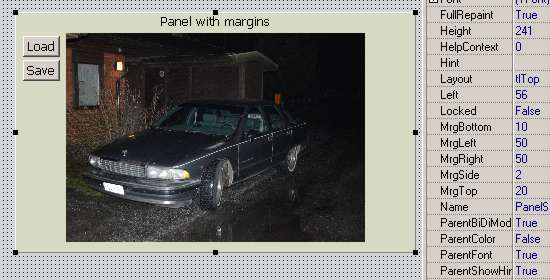
The screenshot shows you a panel with adjustable clientrect. It allows you to add controls and graphics to the sides.
Caprice is aligned to the panel with alClient. When you resize the window or panel, Caprice grows and shrinks automatically.
And the panel keeps margin areas free for buttons and other controls.

In this screenshot the same panel is used as container for combo boxes. The caption text is panels caption.
Combos are aligned with alClient. In property sheet caption has margin reservation on the left.With panels visible code you set visibility of the whole caption-combo-button system.
In drag-drop placement you move the panel. The stuff inside the panel comes to the new position automatically.Panel with margins allows you to reduce the amount of almost useless container panels.
You can put header texts, status and toolbars to the margin areas.System needs few lines to TPanel's internal and overidden AdjustClientRect method.
Network drives download
There is small sample how to iterate network drives from Windows networking, without Shell extensions.
In stand-alone efforts, looping system might turn out to be a bit tricky. In the zip there is an executable and source.For actual usage, you must strip functions from hard coded literals.
-------
In media player, photo and music players, editors and others have often two directory systems.
On left there is common directory-file system. On the right there is currently open playlist.
Playlist creation settings have a panel, which can be opened and closed with one tool bar button.File explorer is usually a sidebar with treeview and listview controls. You can open and close the bars with primary toolbar.
Screen has also a menu bar, whose visibility is set with primary toolbar.
Primary toolbar can be operated with mouse and keyboard ( just like windows quick launch bars )In Mediaplayer icons grows and shrinks with chosen font size. BrResize is good enough for the job. It keeps the mask and picture quality.

Windows provides few ways to build interactive threads into programs and components.
Windows operating system works with messaging. Windows has two kinds of messages. System and user messages.
- User message numbers are in the range WM_USER / $0400 / 1024 ) to $7FFF / 32767.
- When you create custom messages, you must check that the number is not used by some built-in Windows control / component.Within one program you have two functions - Sendmessage, Postmessage - for adding messages into Windows message queue
Sendmessage stops the execution of thread. The sendmessage handler never conflicts with the thread, which sent the message.
- You can for example draw to screen in the handler, without a fear that there would be a conflict with thread and the main program.
- Since thread is stopped, you can alter thread variables freely, without sunc, in the handler.Postmessage returns immediately to thread. Handler can conflict with thread.
- You can use this function to for example inform the main program, that the preview for entry X is now loaded. In the thread you continue with the entry X+1.
- There is also a PostThreadMessage, with what you can send messages to batch job. It uses threads handle instead of windows handle. It needs peek message loop.Thread events ( calls to mainline / program ) are processed independently from mainline. Event handler can conflict with thread.
- You can use events to for example request custom filling of the variables.In Delphi you can use sync function for creating non-conflicting events from thread to mainline.
But when you write exit code for the program, the code you use for waiting the thread, ends sometimes into deadlock.
It happens, when thread is in sync method, when you enter the wait loop in mainline. Delphi cuts the execution of the sync, without exiting and cleaning internal wait loops.
In principle you should be capable of avoid this with Windows WaitForSingleObject funtion. Function allows you to stop execution until some other process / thread ends.Both Send and Post message needs, that you pass known window handle into thread. Event needs procedural pointer in thread.
When don't know the window or you have multiple windows, you use HWND_BROADCAST constant as window handle.
- HWND_BROADCAST sends the message to all created windows in the system.
- You can RegisterWindowMessage for retrieving unique system wide message number. This number is connected with name.
- Call to RegisterWindowsMessage with predefined name always returns the same message number.Windows message gives you two 32 bit variables for the data. It's up to you and your documentation how they are filled.
Windows 95 and later do not any limits for the number of timers. Timer sends messages to mainline, each timer event blocks the execution..
- If you need an independent, non-blocking timer, you must build it with thread and events.
June 24th, 2019 - FAT-32V
Possible that player will get FAT-32V records for files. Record has variable length name entries. The record without trailing variable length part is around 128 bytes.
Variable length names makes the typical record ( without thumbnail ) smaller than current fixed length records.
Most files on HDD are small program-OS-driver files. Their size is fixed, they don't need thumbnails.Besides physical order, entry has one alternative path chain for multi media playlists and others ( 8 bytes ). Chain uses primary FATs directory and file names.
- alternative paths have also root and header entries for grouping photos under theme and sound files under performer / genre.
- FAT entry has packing codes for grouping different versions and related files ( 4 bytes ).
- In variable length part, FAT entry can have one stream for thumbnails and entry related data ( 4 bytes in record ).Files get new type attributes : Executable, Movie, Sound, Photo, Html, Text and Back up file. The attributes creates groups from various extensions.
Group code is an ansi character, user defined / custom file types are also possible.

Physical addresses for HDD get also variable sizes. So that small 32 GB memory card's address variable is big enough for card's capacity, and big 16 TB disk has variables,
which are big enough for covering the whole 16 TB space. The address field size can be added to primary / boot record. When you have the size in boot record,
HDD disks can be enlarged almost endlessly. The frameless video and also analog sound / curve consumes lots of disk space.In the diagram you see the way, you build fragments for files. When you store the last fragment address to header, you don't have to search fragments in between first and last,
when you change the file size. System is simplified, fast CIA indexing system. System optimizes the speed and space you need for indexing. On the other hand you cannot find
header entries for the lost fragments.Free space needs also it's own chain. Traditional two-way CIA system is obviously better with free space. Two way system allows you to insert and remove entries from the chain.
In the system HDD master record has a chain for volumes boot / master records. Volumes master record has leads to free space chains and root entry chain.
System doesn't have clusters and file allocation units. File can have space reservations in primary and fragment entries ( needs two field sizes in records ).
The minimum file allocation size is the size of free entry record. Each volume can have it's own address sizes ( possible when you add the entry addresses to volume address ).In 1-way CIA you move the head-reader to two locations. 2-way system needs head in 3 or 4 locations : all changes need next, current, previous.
First and last need 3. In the others, 4th location comes from file entry header update. Positioning is the most time consuming thing in HDD.When you remove file which is connected to free space, free space routine alters the entry for this free space. Possibly removes free space entry after deleted file.
When you add entry into free space, the addition routine alters or creates entries for free space chain. That's why 2 way chain is better for free space.Fragment skipping is near common binary file skipping.
24th June 2019