HTML script is compiled when you load the page / script file. After that the scripts are compiled by demand. It is possible to generate new script with a script.
Scripts uses variant fields and arrays. They are defined as objects. Length is detected with len property. There are global and local variables. Variable definitions follows common rule : variable outside function is global, variable inside function is local. Variable definition can have default value and dedicated type. Dedicated types are sometimes needed, when you make calculations from the on-screen field-values. Global variables are unit level variables, which can be accessed from other units.
DHTML array is always one dimensional, but an array element can point to another array. You create multidimensional arrays by creating arrays into array.
Script can be embedded into tag or in separate Java script block in Head section. When writing bigger and longer scripts, they are always written to script section in the header. It is possible to write scripts into separate files. It is possible to embed scripts into body. Things you add / change with scripts are temporal on-screen systems. Print or view to HTML source never shows the changes you have done with script.
All HTML tags can be converted into programmable DHTML objects. All tags have ID attribute. ID attribute is the name of the tag. When set, it must be unique throughout the document. In scripts you use IDs just like object names in common programming. Ids can overlap with each other. <p id="ProgrammableTag">Text<b id="BoldSection">Bold text </b>text continues</p>
When you embed documents and Active X controls into document, you give them names with ID attribute. These names are used like parents in common programs. HTML documents are embedded with tags, which has hyperlink to the embedded document. In script you use the tag name, with tag-id.
Both Java and VB uses dots for separating.
Basic caller of the script is hyperlink definition. You replace literal hyperlink, with script function and parameters. <a href="javascript:ScriptName(Parameters);">
The events for each tag varies. Event handlers are added into tags by adding the event and script call into tag. <p onclick="javascript:clicker" onenter="javascript:entering">All table elements can have IDs. Table is collection of tags. Tags can be accessed with Row and Column numbers, too. When you add x-number of rows or columns into table, usage of IDs is difficult, row-column number system ( without IDs ) is usually easier. DHTML do not have a command, with what you can convert generated, literal ID name into a pointer value, which refers to the ID.
MS Script editor help has full documentation for DHTML-4.
Media player will get DHTML-4 plus scripting. In 4-Plus IMG element has original picture and video sizes. Then there is media player element, which defines basic functions for playing music, videos and photos. HTML does not have sound element, there is only BgSound, with you can play background music.
Also possible that 4-plus will get a strip attribute. With strip you could drop "decorative" elements from the screen, when it is shown on small handheld player's screen.
Besides dedicated viewports, 1k, 2k and 4k system gets a screen resizer system. OS can increase and decrease the screen size with picture editing system. In good picture editor you always increase / decrease size with even number of pixels : one pixel is enlarged to two, three, four, etc pixels. The size is downgraded so, that one pixel has two, three, four, etc. pixels. Free, random scaling always messes the screen layouts. After you come back from another scaling, controls do not keep their places, they start to move on the screen. ( in picture editor, the picture gets messy, because pixel values changes ).
4-plus will not support dangerous Java-applets and embedded objects ( they are hardly ever used / enabled ). New ActiveX controls ( possible also Fonts ) must be installed to computer. When you try to install these things via web, the execution stops, you have to install new objects into computer. The browser can use rather freely installed Plus-4 compatible programs / objects.
DHTML-4 and DHTML 4-plus are safe systems. They do not allow manipulation of the computer via uploaded page. Fucking hacking 6T jerk always comes and makes messes via underlying TCP-IP network, web-browser's hidden features and installed add-on programs for web browser.
DHTML-5 grants access to the essentials of the computer. Then it violates your privacy / human rights. It has nothing, which would improve / ease the page creation. DHTML-5 misses DHTML-4's widely used automated frame system. In DHTML-5 you must always position and resize embedded pages manually with scripts. DHTML-4 frames are needed on certain sophisticated pages. On ATS site Fairy Tales and Maxwell Thunderbird stories / players are in DHTML-4 frames. You need D4 frames, when you have sidebar-header-footer, with what you load contents for the main page. Not possible with D5. DHTML-5 pages and browsers seems to be very slow.
Localization in 4-plus goes with flags and new permanent browser storage. All pages can have small ini-file formatted local text files. You can store and read the selected flags into it. HTML page has free access to these files. Files are additions / replacements for cookies ( when you access these files, browser will not restrict access / prompt confirmation ). Simple text files, which cannot be activated / converted into executables or macros.
Media Player will get two networks. Private and open. Destiny of the open network is open. Web browsers and other port 80 systems uses open network. By default open network has write access to the uploaded file and email storages. Read-write access to cookie-settings storage. Local eMail program takes care of the final filing, the communication line does not need such.
Communications are always file based, right to write files is always needed. Open network communication line do not have rights to create ( at least executable ) memory blocks. FTP protocol has indirect write access to hard disks ( user chooses the directory, etc. ), it can query the contents of the currently open file. Executables in the storages are not processed automatically. A macro in attached file cannot be controlled. Attached HTML file follows the common browsing rules.
Local eMail program can use special restricted hard disk space. Whole or a part from special restricted eMail space can be encrypted, it is accessible via eMail program, but not via network. eMail program is read only executable, you got to certify the program. Rules and laws for mails delivery-privacy-secrecy are very tight. Mail robberies / blockings are the second biggest crimes, after bank robberies. Eavesdropping phone or opening letters / hacking eMails are crimes which matches to burglary : Penetration to someone's home and privacy, without permission. Cops and others needs court order for doing such. Idea of braking the rules for national interest requires that your parliament / government makes a decision, that this thing / reason has national interest. You need a document from decision and voting results. Not possible for you and the supporting midgets to do such decisions. When you play your bold games with things, which are close to national interest, you are in danger to get a conviction from terrorism to yourselves.
Active desktop, option for downloading and running program directly from the web and others will be scrapped.
Open network does not prevent creation of the honestly made email / ftp-programs and web browsers.
Private network is like the current network.
From the below you find basics for using dHtml-4 interface with Delphi ( 5 ). Web browser component has document interface. You take it use by declaring variable for HTMLDocument. After you assign the document property into this variable, you get access to Document rooted DHTML-4 features. ( the most from the document ). Web browser is closed unit. You can never send any data from the component to the program and manipulate program flow with component. ( it comes from the safety ). It possible that in DHTML-4+ you can get script events to program. Events never allows the caller to manipulate the target. A chance for external event handler is never a security risk. You need external event handlers with custom browsers. In for example database application. Player program is another, which needs information / events from the DHTML-4+ component. You need for example resize events.
Help for WebBrowser misses the requirement for declaring the variable for the Document property. Document property is a useless pointer.
Upgrade to newer browser version, needs that you re-generate enormous MsHtml unit. All DHTML-4 functions and properties are declared there. In principle re-generation happens with only one-click. In practice more is usually needed.
unit Car07;
interface
uses
Windows, Messages, Classes, MsHtml, OleCtrls, SHDocVw;
type
TCar007 = class(TForm)
wHtml: TWebBrowser;
Public
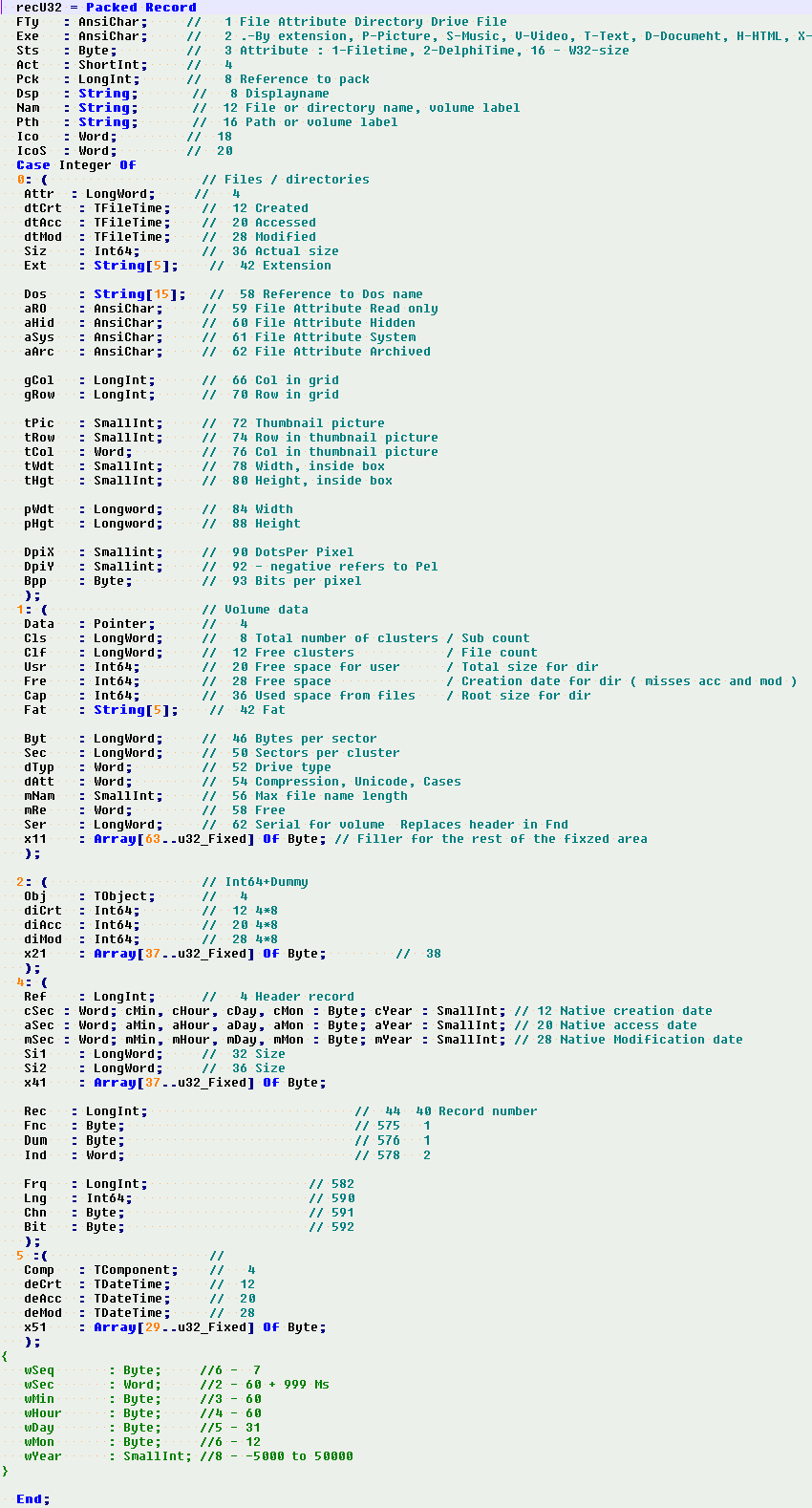
wbDocument : HTMLDocument;
Procedure ToHtml(HtmlFile : String);
End;var
Car007: TCar007;
implementation
Procedure TCar007.ToHtml(HtmlFile : String);
Var
wS : TStringList;
Begin
wbDocument := HTMLDocument(wHtml.Document);
If wbDocument <> nil Then Begin
wbDocument.close;
wbDocument.clear;
End;
wS := TStringList.Create;
wS.LoadFromFile(HtmlFile);
wbDocument.write(wS.Text);
wbDocument.title := 'Loaded via DHTML com-interface';
wS.Free; wS := nil;
End;
End.
HTML size support for executables
Media player will get a support for scaling the screens. When you design screen for 1280x720 ( or corresponding ) screen resolution you design the screen for 96 DPI scaling system. 96 DPI is set to equal HTML's normal screen size. Below this there are 84 DPI and 72 DPI scales. With 72 DPI font size 8 falls to 6, with 84 DPI it falls to 7. Actual DPI for 8 to 6 scaling is 69.82. For 8 to 7 DPI is 75.55.
Basic problem with scaling are floating controls. In order avoid floating, you should follow the tables below. When you shrink data, you run out of unique numbers, in order to provide all sizes unique shrink values you must not use certain sizes in native screen design. The forbidden sizes are 3, 7, 11, 13 and 17. These 20 number ranges are in force to the end.
In the next range forbidden numbers are 23, 27, 31, 33 and 37. In tables yellow-box numbers are rounded up, red-box are rounded down. White boxes are rounded with common up-down rule. From the grayed columns, you see how the resize function calculates forbidden values.
|
DPI - 72 |
Size | 0 | 1 | 2 | 3 | 4 | 5 | 6 | 7 | 8 | 9 |
| Scale | |||||||||||
| Exact Down | 0,75 | 0,00 | 0,75 | 1,50 | 2,25 | 3,00 | 3,75 | 4,50 | 5,25 | 6,00 | 6,75 |
| Rounded Down | 0,75 | 0 | 1 | 2 | 2 | 3 | 4 | 5 | 5 | 6 | 7 |
| Exact up | 0,75 | 0,00 | 1,33 | 2,67 | 2,67 | 4,00 | 5,33 | 6,67 | 6,67 | 8,00 | 9,33 |
| Rounded up | 0 | 1 | 2 | 2 | 4 | 5 | 6 | 6 | 8 | 9 | |
| . | |||||||||||
| Scale | 10 | 11 | 12 | 13 | 14 | 15 | 16 | 17 | 18 | 19 | |
| Exact Down | 0,75 | 7,50 | 8,25 | 9,00 | 9,75 | 10,50 | 11,25 | 12,00 | 12,75 | 13,50 | 14,25 |
| Rounded Down | 0,75 | 8 | 8 | 9 | 10 | 10 | 11 | 12 | 13 | 13 | 14 |
| Exact up | 0,75 | 10,67 | 10,67 | 12,00 | 13,33 | 13,33 | 14,67 | 16,00 | 17,33 | 17,33 | 18,67 |
| Rounded up | 10 | 10 | 12 | 14 | 14 | 15 | 16 | 18 | 18 | 19 |
| DPI- 84 | 0 | 1 | 2 | 3 | 4 | 5 | 6 | 7 | 8 | 9 | |
| Exact Down | 0,88 | 0,00 | 0,88 | 1,75 | 2,63 | 3,50 | 4,38 | 5,25 | 6,13 | 7,00 | 7,88 |
| Rounded Down | 0,88 | 0 | 1 | 2 | 3 | 3 | 4 | 5 | 6 | 7 | 8 |
| Exact up | 0,88 | 0,00 | 1,14 | 2,29 | 3,43 | 3,43 | 4,57 | 5,71 | 6,86 | 8,00 | 9,14 |
| Rounded up | 10th | 0 | 1 | 2 | 4 | 4 | 5 | 6 | 7 | 8 | 9 |
| . | |||||||||||
| 10 | 11 | 12 | 13 | 14 | 15 | 16 | 17 | 18 | 19 | ||
| Exact Down | 0,88 | 8,75 | 9,63 | 10,50 | 11,38 | 12,25 | 13,13 | 14,00 | 14,88 | 15,75 | 16,63 |
| Rounded Down | 0,88 | 9 | 10 | 11 | 11 | 12 | 13 | 14 | 15 | 16 | 17 |
| Exact up | 0,88 | 10,29 | 11,43 | 12,57 | 12,57 | 13,71 | 14,86 | 16,00 | 17,14 | 18,29 | 19,43 |
| Rounded up | 10 | 11 | 12 | 12 | 14 | 15 | 16 | 17 | 18 | 19 |
DPI for common screens goes so that 1600x900 = 120 DPI, 1920x1080 / 2k = 144 DPI, 3k - 288 DPI, 4k - 384 DPI. These enlarged DPI's do not have rounding and spacing problems. 1k - 2k conversion multiplier is 1.5. Conversion does not create exact matches from the screens, it creates non-floating screens only. Number one and two remains unchanged quite a long times.
Scaling is twisted so, that you can use numbers 5 and 15 in your screen designs. Scaling can be attached to the old programs, by operating system. Downsizing to 84-72 should be disabled for non native media player programs.
Biggest screens are already 70 inch screens. In cars screen size falls to 10 inches or less. Media player needs the scaling system. Car player uses often "too high" screen resolution. 1920 * 1080 resolution is not rare in car player.
Player needs small control screen. Separate small screen, which can be embedded to remote control, computer's main screen, etc. Control screen needs it's own contents and resolution settings.
4k screen has rather tight demand for display manufacturers. 384 DPI means that the dot size must be 0.06615 millimeters or less. In traditional LED display each dot has three bulbs. Each bulb must be 0.03 mm or less. New tech has only one bulb per dot.
Not very clear how the 1k, 2k, 3k and 4k are calculated. 1280*720 is rather far from 1920 * 1080. 1k size for 1920*1080 resolution is 960 * 540 pixels. Such size has never used or existed. Pixel counts do not match either. 1920*1080 has 2 073 600 pixels, 1280 * 720 has 921 600.
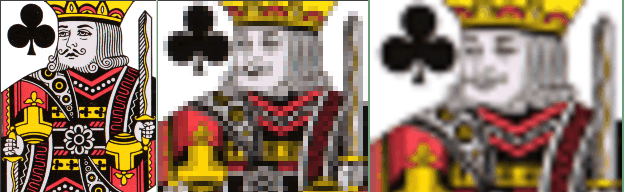
In this picture you basic problem with various picture
sizes. And also the power of BrResize function
On left there is original scan from King of graveyards. In the middle and
right the king is shrank to 10% from the scan size.
The result from the best smart resizer I had, is in the middle. BrResize
is on the right. BrResize managed to keep the king's face
When you go upwards, it is much the same. BrResize is the only function,
which allowed to use and scale old 4-bit 96x71 cards in ATS solitaires.
I have tested CBS colors with RGB pictures. CBS based picture enhancers are much like BrResize ( already with RGB data ).
Before resize the scan was pre-processed with color flattener. Scanned 16-color picture had around 70 000 colors. Flattener dropped the count to 800.
ATS Games
All new ATS games have resolution independent main screens. In solitaires you got to position slots, decks and others. The solitaire's main screens are designed with logical units. Horizontal base unit 100 is width of the card, vertical base unit 100 is height of card. When you open the game, these design time logical units are converted to pixels. Conversion is made with current view port size. Converter is in display engine, actual game programming and board designing is easier and faster than with physical units. Resolution independent system is sub system in the system, which allows the same game to have multiple board-variants.
The resolution independent screening system is over 20 years old already. Still unique to R&D / ATS games. In for example 3D game design, you use physical units.
Addition and usage of the resolution independent controls and areas is quite a lot easier than in 3D system. Resolution independent system uses self-made object arrays. With array index, you can manipulate, add and delete objects in the display engine. Array has object like methods and properties. In solitaires the display engine array holds also the game-play data. Simple solitaire games have only around 500 lines in Pascal source and around 400 lines in DFM file. The game engine unit is not very big either, currently around 2000 lines.
Elliptical Line
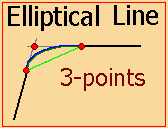
Media player will present an idea from elliptical line. Elliptical line is 3 point line. It is given with two connection points. 3rd is intersection of the tangents from the connected lines. In 2d-3d systems you can create curved meshes with elliptical lines. Not possible to use arcs, because arc does not form simple closed regions. Elliptical line is always guaranteed to form a shape which is easy to fill with manipulated textures. With elliptical lines and curved meshes you can get smooth rounded shapes into games and others.
When you connect curved lines you use tangents for the endpoints. System is fully supported by existing hardware. Bezier curves are usually set so, that the curve forms an elliptical line. Elliptical line does not need Bezier points. Bezier-arc has free extension points for both ends of the curve. In self made elliptical line you set both points to the tangential intersection.
When you change end point positions, elliptical line does not need programmed calculations. Automated elliptical line is the only way to make curved meshes and shapes. No matter how you twist the mesh, the curved boxed area remains simple ... relatively simple. Simple enough for stretching the texture.
These elliptical curves and meshes are only 15 years old by now. Grabbed them to media player from the old game prototypes.
- - Height maps - -
Media player implements also the old height map system. Height map is gray scaled bitmap. The ground level for the height map is the underlying shape. The height map has detailed z-positions for the pixels in the shape ( rectangle-circle-polygon-ellipse ). You can use height map for carving molds for the designed items. Height map has details for shape.
In games and other 3d systems, you use height maps for creating shadows and shadow maps. Shadow map is another gray scaled bitmap. Shadow maps are used for Alpha blending. In one Alpha-blend form you set lightness for the pixels Alpha blending is also used for setting transparency of the object. In video editing you use alpha blending for setting speed for transitions. In picture editing you use blend-maps for creating predefined shapes.
- - Angled shapes - -
For animation media player will introduce angled points, lines and shapes. Angled line has start point. The end point is calculated from length and angle. When you change the key-points position position ( angle or length ), the whole shape and all overlying bounded shapes moves accordingly. You can for example easily build a system, which simulates planetary rotations. Planetary rotation system is almost impossible without angled shapes.
In games angled system makes animations simple and fast.
In angled system you cannot change underlying system from overlying system. When you do so, changes to underlying animation system ends easily into eternal loop. You must always consider and prevent looping in your program.
4k support
Media player is also getting screening components and functions which has run time scaling systems. Most important is hosted object called ThGlyph. ThGlyph is a general usage sub-object which holds text and icon for outlines, listboxes, grids, treeviews, listviews, etc. Hosted object is an object, you can add into any control-object or windowed-object. ThGlyph resizes both text and graphic. ThGlyph will also get limited HTML formatted text display capabilities. When HtmlText is checked in options, html tags are skipped, part of the commands will be processed. Processed commands are naturally text formatting tags and CSS-styles. ThGlyph supports various inplace editors : comboxes, checkboxes, multiline edits, common edits, etc.
If you are too young or distant to remember, on the right you see reason for the support to multiple simultaneous screen resolutions. The screen shot is from old DOS based Yatzhee game from the year 1993. The game is still playable, also in window.
It uses the given very low resolutions, when you play it.
In 4k you increase the resolution for big pictures. Without change in viewport's resolution, DPI for the picture remains unchanged. When you show the uncompressed picture / frame, the area it takes grows. When you resample picture for view, you drop pixels from the picture : You adjust picture's DPI so that it fits into view port. Shrinking downgrades the quality of the picture.
BrResize keeps the dropped values better than other resizerss. Like I said in 2010, it is so slow, that you have to add it to graphic card's CPU. It dies when you resize big 4k or better pictures. 4k needs CPU support for MPEG-JPEG compression and decompression, too.
All new cameras takes pictures in 4k / 300 DPI or better. In order to get proper benefit from the high capture quality, you must use high resolution windows. Possible that such chance would be added to DHTML 4+ image-video component. Like I said, DHTML 5 gives benefit to control freaks and a-likes, only.
All computer programs can have software and hardware implementations. In for example cars, you usually write and test the code as common software. After the program is finished, it is burned to CPU. Chip makers, who rejected Deca-tech do not do these chips. The last home analog audio systems from early 1990's had very complicated electric programs, electric program is a computer program, which is made with small transistors, resistors, capacitors, relays and others. Electric programs were common in automated machines, which were used in manufacturing.
One possible option for media player is a chance to write programs directly to additional CPU units. You could write programs for graphic cards CPU, MPEG encoder-decoder and so on. All modern graphic cards have a standard set of commands for windows drivers. GDI, OpenGL and Direct X commands are executed in Graphic cards CPU. Program which is written for additional CPU does not use main CPU for passing the commands. For programs you need RAM memory for storing variables and others. When you block the reserved memory from primary CPU, there are aren't any conflicts.
Major different in Graphic GPU and common CPU is in smallest data size. GPU plays with bits, CPU with bytes. In double programming, you build the screen and response to paint event in GPU program. With CPU you modify data. Traditional additional CPU-system has a burned program in ROM memory. Motherboard's bios ( which controls chipset ) was usually burned to small ROM block. Nowadays they use programmable ROM blocks. Creative's EMU and later Sound chips uses common RAM. Sound Blaster - AWE had memory for MIDI banks, etc on board.
Textbase support
Typical for textbase file is that, there are missing fields and fileds with more than one value. There will be a data storage object for meeting these demands. Two proto types are special editions from Delphi's TStrings object. Besides TB demands, there is support for all common list types : Tabular grid, directory tree and common list. Storage object is ThGlyph like all-in-one system.
Return to ini-files
In media player you return back to ini files. Ini files were abandoned in mid 1990's. Reason was inexperienced users. Accidental changes to essential settings are rather common amongst inexperienced. When inexperienced user does so, it is a catastrophe. He-she has to ask help or take computer to repairs. Nowadays common users / people knows computers so well, that accidental changes to settings are rare. Even when you do so, you are not completely helpless, like you were in 1990's. Another reasons were slow processing speed and memory consumption, computers were very slow then. Windows 3.1 consumed over half from the installed memory.
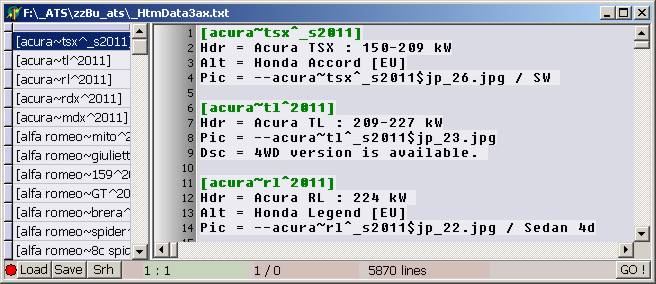
On the left you see route creation maintenance for ATS games. On the left there is list from entered points. As you can see it is in ini-file format. It is also maintained with the in-out functions for ini-files. In this program system is very good for searching reason to the points and tracks, which are not - as you can see - in the intended shape and positions. In the end the functions you write for debugging, comes into good usage. You get excellent save-load setting systems. DOS had even more difficulties with memory. By default DOS program can use 640 kB memory Usage of high memory needs / needed changes to programs. No matter how much memory you have in your computer, old DOS game uses 640 kB memory block. Run out of memory errors are common in old games ... programs. Usualy they work in new computer. But were often made so that, they use computers maximum operating speed. Such system speeds up the game, nowadays often too much.
Debug screen on the right is general usage text box. Contents is always written and read with the program, which opens and uses the debug / error log window.
? Delphi has ready-made ini-file object, with what you can maintain ini-formatted TStrings objects. As you can see, the screen on the right is maintained with self-made ini-handlers. Formats are not the same.